 Tinsy
Tinsy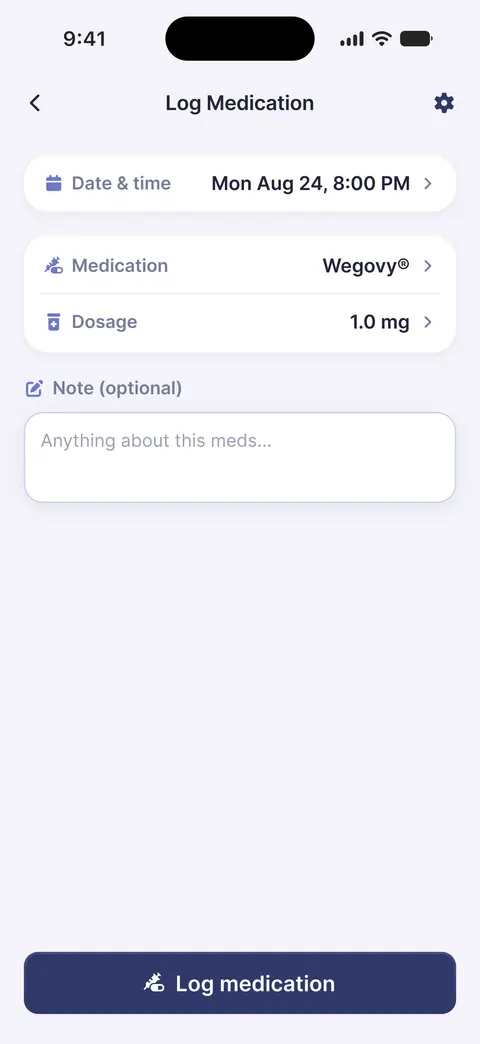
Shots and pills logging
Every dose, every form, in one diary. Logging a dose takes seconds.
A weekly shot, a daily shot or a pill every morning: Tinsy logs it the same quick way. Pick your medication at setup or add your own, and the diary follows your schedule.

Ozempic® is in the Tinsy injection list. Logging it is free.
Tap to log, pick the spot on the body map, save. Tinsy remembers where the last shot went and suggests the next one.
Reminders follow your schedule, weekly or every N days, and the calendar shows when you injected and what comes next.
Mounjaro® is a tirzepatide treatment and sits in the same injection list.
Date and time, the dose your prescriber set and the injection spot. The entry joins your calendar and history straight away.
Split doses and custom dose changes fit the schedule, so the diary keeps up when your prescriber adjusts the plan.
Both are in the injection list, and both have their own page, linked below.
Log a Wegovy® shot with its spot, or choose pill at setup and log a tablet without one. Reminders follow either rhythm.
Log each Zepbound® shot, follow the suggested next spot, and keep a schedule that is weekly or every N days.
Saxenda® is in the injection list too. Not every plan is weekly, and the diary does not assume it is.
At setup, choose every day instead of once a week, and the dose reminder follows that schedule.
Each Saxenda® entry lands in the same calendar and history as any other dose, with the spot you used.
Pills are a first-class record in Tinsy, not an afterthought.
Tell Tinsy which tablet you take and how often, and it logs each one the same quick way.
A tablet entry has the date and time, the medication and the dose, with no injection spot to choose. Reminders work exactly as they do for shots.
These are free forever in Tinsy, whichever medication you log.
Every dose, every form, in one diary. Logging a dose takes seconds.
Weekly, every N days, split doses or custom dose changes. The reminder follows the plan you were given.
See when you dosed and what comes next, in the app or on your home screen.
See our Privacy Policy.
Tinsy Plus is an optional subscription, billed monthly or yearly, with a 7-day free trial for eligible new subscribers. The same for every medication.
Weight and body measurements as a trend over weeks, not a single number. Part of Tinsy Plus.
Logged next to your dose, so you can see which days they follow. Part of Tinsy Plus.
Charts and trends, including your estimated medication level over time, from your own log. Part of Tinsy Plus.
A PDF with your whole treatment history, Apple Health sync, protein, water and fiber goals, and a cycle marker. Part of Tinsy Plus.
Yes. Ozempic® is in the Tinsy injection list. You log each shot with its date, time, dose and spot, get reminders on your schedule, and see the history in a calendar. Logging is free; Tinsy Plus adds weight, side effects, charts and the doctor report.
Yes. Mounjaro® is in the injection list, and Tinsy is built for tirzepatide as well as semaglutide treatments. Split doses and custom dose changes are supported in the schedule.
Yes. Tinsy treats pills as a first-class record, not an afterthought. Choose pill at setup, tell Tinsy which tablet you take, and log each one in seconds. Reminders, the calendar and the history are free for pills exactly as for shots.
Tinsy logs daily tablets as well as weekly shots. At setup choose pill and tell Tinsy which tablet you take and how often. Each entry records the date and time, without an injection spot.
Yes. Tinsy is a diary for semaglutide and tirzepatide treatments, weekly injections and daily tablets. Wegovy® and Ozempic® are in the injection list by name, and you can add your own medication.
No. Tinsy never calculates or recommends doses, whatever your medication. Your prescriber sets and adjusts the dose; Tinsy records the plan you were given. Tinsy is a wellness diary, not a medical device.
Write to us and a person answers. Or go deeper on one medication.
Anything about your dose, your side effects or whether to switch medication belongs with your prescriber. Tinsy is a diary, not a clinic.
Wegovy® trackerZepbound® trackerPills vs injectionsWhat week one feels likeTinsy home
Shot or pill, logging is free for as long as you use Tinsy. No account, no card.